

Workflow migration

A cleaner, faster path
from Nintex to Power Automate.

Upload a Nintex export and see what converts, what needs review, and what can ship as an importable Power Automate package when supported.
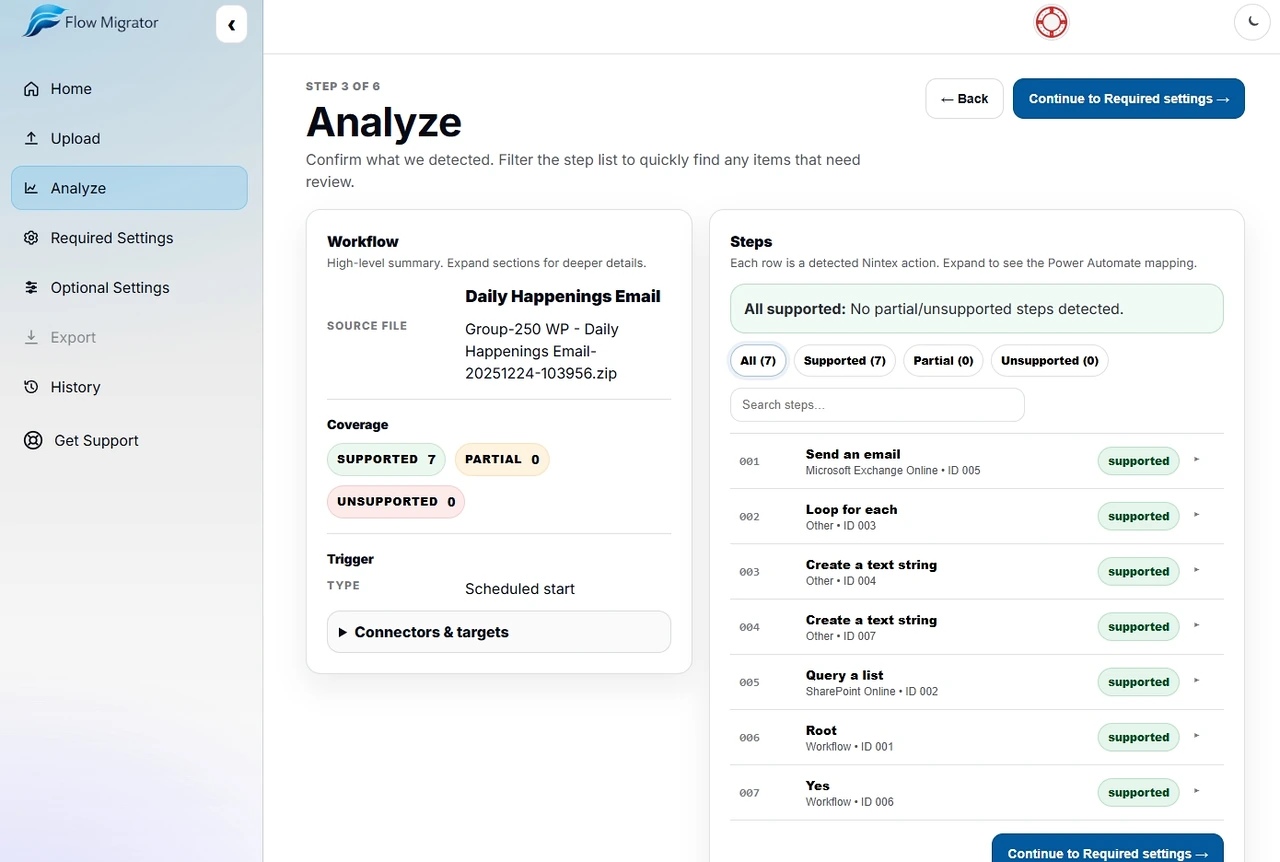
Coverage reportSupported / partial / unsupported
Draft structureScopes, branches, key steps
ZIP export (Pro)When supported, importable package
SupportsNintex Automation Cloud · Nintex for SharePoint (.nwf/.wf, including on‑prem exports) · Power Automate
Need the dedicated migration overview? See the Nintex to Power Automate page.
Analyze screen showing workflow coverage, filters, and mapped steps in Flow Migrator.
Product walkthrough

See the workflow in action.

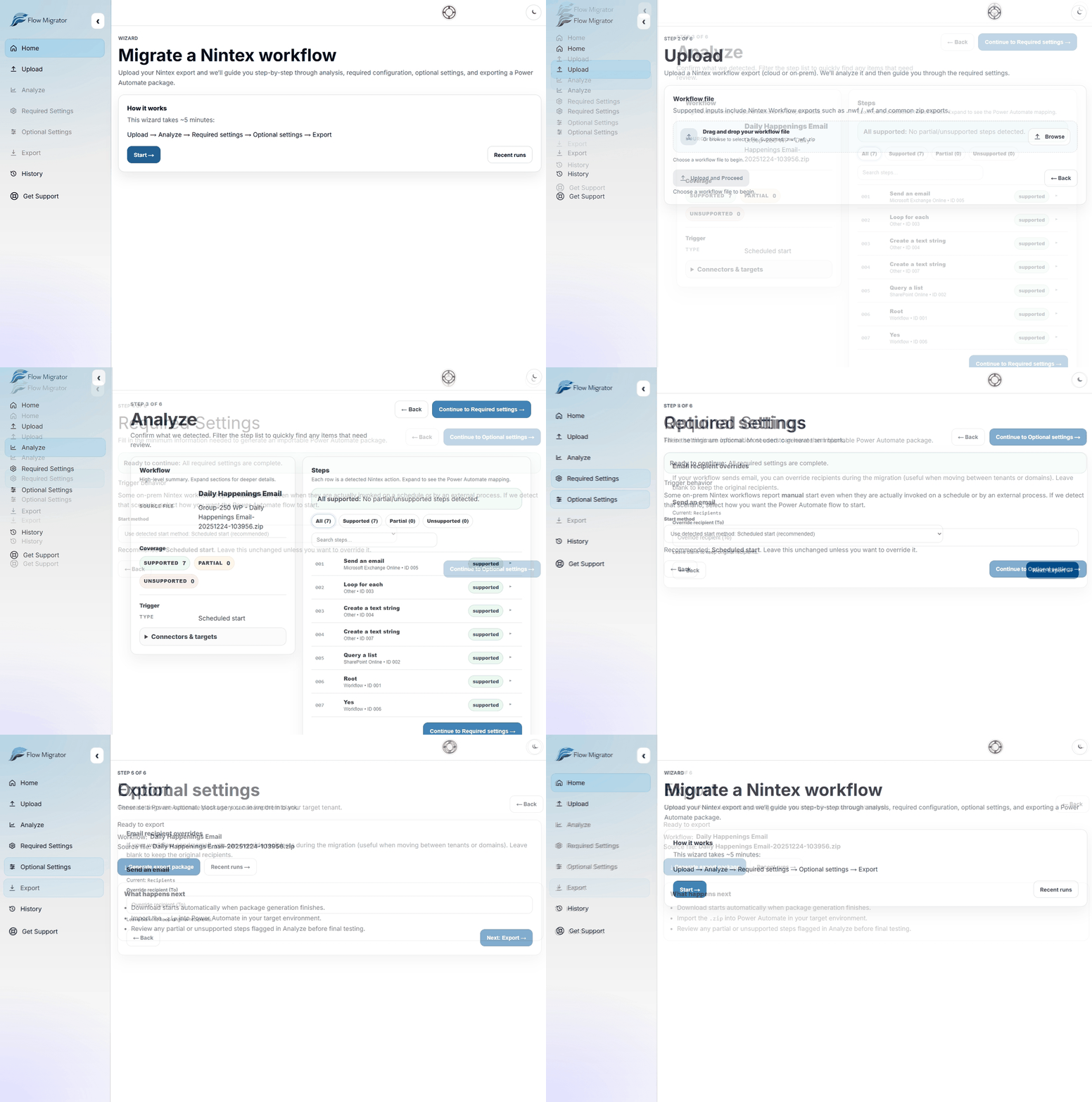
Upload → Analyze → Configure → Export. One guided path, one clear next step on every screen.
Real app walkthrough
Animated walkthrough of the Flow Migrator app showing Home, Upload, Analyze, Required settings, Optional settings, and Export.
What you get

Clear outputs you can act on.

A migration-ready report, a structured draft, and exportable artifacts when supported.

Action-level coverage
See blockers and effort instantly
Structure-first draft
Standardize rebuild work
Faster migration
Reduce manual build time
Report
Coverage report
Action-by-action clarity on what will convert, what won’t, and why.
  • Supported / partial / unsupported classification per action
  • Notes on blockers + recommended equivalents
  • Quick triage for scope, effort, and risk
Draft
Draft structure
A clean scaffold so you’re refining a draft—not rebuilding from scratch.
  • Generated outline of scopes, branching, and key steps
  • Standardize rebuild work across a team
  • Highlights what needs manual attention
Export (Pro)
ZIP export
When supported, generate an importable Power Automate package.
  • Downloadable package output for faster handoff
  • Designed to reduce manual rebuild time
  • Coverage included even when export isn’t supported

*Export availability depends on workflow patterns and connector support.

Process

A simple, repeatable flow.

Upload, analyze, configure, and export in one short guided flow.

Upload
Analyze
Configure
Export
From export to a clearer migration handoff—predictable, repeatable, and easier to scope.
01
Upload
Start with the workflow export.
Upload a Nintex export (.nwf, .wf, or a Nintex Automation Cloud export ZIP) to begin the guided migration wizard.
02
Analyze
See coverage before you commit.
Review supported, partial, and unsupported actions so effort, blockers, and risk are visible immediately.
03
Configure
Complete the guided configuration.
Map the required trigger and SharePoint settings, plus any optional recipient changes needed to generate a clean export.
04
Export
Generate the Power Automate package.
Download the package when supported, then import it into Power Automate and validate any flagged steps before production use.
Who it's for

Built for migration teams.

Clear, governance-friendly deliverables for admins, consultants, and delivery teams.

Power Platform Admins
Standardize migrations across environments, connectors, and governance.
  • Consistent coverage reports for scoping and prioritization
  • Structure-first drafts to accelerate build work
  • Cleaner handoff and repeatable delivery across teams
SharePoint Admins
Move workflow automation off Nintex with clear remediation and less rebuild effort.
  • Identify dependencies and high-effort workflows early
  • Map actions to Power Automate equivalents with notes
  • Focus rebuild time only where support is partial/unsupported
Consultants / MSPs
Deliver migrations with clearer estimates, fewer surprises, and stronger artifacts.
  • Faster discovery and portfolio-level estimation
  • Standard artifacts for stakeholder sign-off and tracking
  • Repeatable process across clients and tenants
Also useful for
Security & ComplianceCenter of ExcellenceIT LeadershipDelivery / PMO
Built for migrations at scale.
Standardized outputs help you scope quickly, align stakeholders, and execute with fewer surprises.
Pricing

Start simple. Upgrade when needed.

Run a free workflow analysis. Upgrade to Pro when you need ZIP downloads, retained run history, and clearer diagnostics.

Free
Run a workflow analysis and get a coverage report. No ZIP downloads.
Free
$0
Analysis
Workflow analysisCoverage report
  • Workflow analysis (grouped by connector, supported/partial/unsupported).
  • Trigger detection + flow outline.
  • Best‑effort target extraction (site/list, recipients, etc.).
  • Uploaded files are processed to generate your report and are not retained after processing on the Free tier.
Pro
Generate importable ZIPs (when supported), retain run history, and get clearer diagnostics.
Recommended
$1498
/year
per user • per client • billed annually
Licenses are assigned per customer organization. MSPs and consultants typically purchase one license per client tenant.
Unlimited analysesZIP downloadsSaved history
  • Generate an importable Power Automate ZIP when the workflow is supported.
  • Improved diagnostics (clearer blockers + recommended fixes for partial actions).
  • Saved run history + uploaded exports retained up to 6 months by default.
  • Priority access to new features and improvements.
Contact us
Supported Nintex formats
Flow Migrator supports Nintex Automation Cloud exports and Nintex for SharePoint (.nwf/.wf) exports, including on-prem workflows. The analysis report flags partial and unsupported steps, and exported flows may require review for those items.
Billing note
Need invoice/PO or admin provisioning? Contact us after signing in.
FAQ

Common questions.

Short answers to the questions admins and migration teams ask most.

What does the analysis include?
Flow Migrator analyzes your Nintex export and produces an action‑level coverage report (supported / partial / unsupported), plus a clean flow outline so you can scope and prioritize before rebuilding anything.
Is this fully automatic?
When supported, Flow Migrator can generate an importable Power Automate package (Pro). When it isn’t, you still get the coverage report + draft structure so you’re not rebuilding from a blank page—you’re only rebuilding what’s missing.
When do I need Pro?
Upgrade when you want ZIP downloads (when supported), retained run history, clearer diagnostics, and retained uploads for continued iteration during a migration project.
Which Nintex formats are supported?
Nintex Automation Cloud export ZIPs and Nintex for SharePoint (.nwf/.wf) exports are supported, including on-prem SharePoint workflows. The analysis report flags partial and unsupported steps, and exported flows may require review for those items.
What if my workflow is unsupported or partial?
Run a workflow analysis first—then send us the export and the coverage report (especially the unsupported actions). Real workflows are the fastest way for us to expand compatibility. Even before support is added, the report tells you exactly what needs manual rebuild work.
Do you retain my uploads?
On the Free tier, files are processed to generate your report and are not retained after processing. On Pro, uploads and run history may be retained up to 6 months by default to support active migration work.
Can you help estimate migration scope and effort?
Yes. The coverage report is designed for scoping—what converts cleanly, what needs review, and what requires rebuild. If you’re migrating a portfolio, contact us and we can recommend a repeatable approach for estimating effort across workflows.
Can we pay via invoice/PO or need admin provisioning?
Yes—if you need invoice/PO or admin provisioning, reach out after signing in and we’ll coordinate billing and access.

Start with a workflow analysis.

Start with a workflow analysis to get immediate coverage and a draft structure. If something comes back unsupported, we’ll help you plan the next step quickly.

Prefer email? Contact us and we’ll respond quickly.